
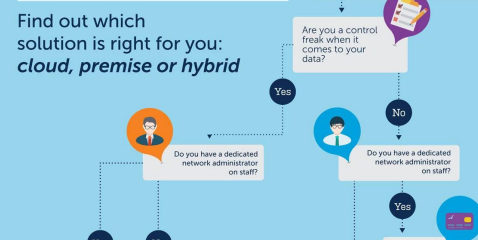
Cloud Servers and Dedicated Servers do battle as we highlight the Pros and Cons of each in this infographic.

In today’s digital-first business environment, choosing the right hosting infrastructure is one of the most critical technology decisions an organization can make. Whether you’re running a business website, an eCommerce store, enterprise applications, SaaS platforms, or resource-intensive databases, your hosting environment directly impacts performance, security, uptime, and customer experience.
Two of the most popular hosting solutions are Cloud Servers and Dedicated Servers. While both offer significantly better performance than shared hosting, they serve different business needs and come with their own strengths and limitations.
This article explores the advantages and disadvantages of both hosting solutions, helping businesses understand which option aligns best with their technical requirements, growth plans, and budget.
Understanding Cloud Servers
A cloud server is a virtual server hosted on a network of interconnected physical servers. Instead of relying on a single machine, cloud hosting distributes computing resources across multiple servers within a cloud infrastructure.
This architecture allows businesses to access computing power, storage, networking, and security resources on demand.
Major cloud providers include Amazon Web Services (AWS), Microsoft Azure, Google Cloud Platform (GCP), DigitalOcean, and Oracle Cloud.
Understanding Dedicated Servers
A dedicated server is a physical server exclusively allocated to a single customer. Unlike cloud hosting, no other users share the hardware resources.
The organization has complete control over the server, including CPU, RAM, storage, operating system, firewall configurations, and software installations.
Dedicated servers are commonly used by enterprises requiring predictable performance, strict security controls, and complete hardware ownership.
Cloud Servers: Advantages
1. Excellent Scalability
Cloud hosting is designed for businesses with changing workloads.
Resources such as CPU, RAM, storage, and bandwidth can be increased or decreased within minutes without replacing hardware.
This makes cloud servers ideal for:
- Seasonal businesses
- eCommerce websites
- SaaS platforms
- Marketing campaigns
- High-traffic applications
2. High Availability
Cloud providers distribute workloads across multiple physical servers.
If one server fails, another immediately takes over.
Benefits include:
- Minimal downtime
- Automatic failover
- Better disaster recovery
- Business continuity
This redundancy significantly improves service availability.
3. Pay-as-You-Go Pricing
One of cloud computing’s biggest advantages is flexible billing.
Instead of purchasing expensive hardware upfront, businesses only pay for the resources they consume.
Benefits include:
- Lower initial investment
- Better cash flow
- Cost optimization
- Easier budgeting
4. Faster Deployment
Cloud servers can be deployed within minutes.
Businesses no longer need to:
- Purchase hardware
- Wait for shipping
- Configure data centers
- Install networking equipment
This accelerates project launches and reduces infrastructure delays.
5. Global Infrastructure
Most cloud providers operate data centers worldwide.
Organizations can deploy applications closer to their users, reducing latency and improving website performance.
Benefits include:
- Faster loading times
- Better user experience
- Geographic redundancy
- Multi-region deployments
6. Built-in Backup Options
Cloud environments typically include:
- Automated backups
- Snapshot recovery
- Disaster recovery services
- Geo-redundant storage
These features improve data protection while reducing administrative effort.
Cloud Servers: Disadvantages
1. Variable Monthly Costs
Although cloud hosting eliminates large upfront expenses, monthly bills may fluctuate based on:
- CPU usage
- Storage
- Network traffic
- Backup services
- Additional cloud features
Without proper monitoring, cloud costs can increase significantly.
2. Shared Infrastructure
Although cloud environments isolate customers virtually, the underlying hardware is still shared.
In rare situations, neighboring workloads may impact performance.
Premium cloud providers minimize this issue, but it can still occur.
3. Internet Dependency
Cloud resources require internet connectivity.
If internet access is disrupted, administrative access to cloud resources may become temporarily unavailable.
4. Vendor Lock-In
Migrating from one cloud provider to another can be challenging.
Different providers use unique:
- APIs
- Storage systems
- Networking architectures
- Proprietary services
This may complicate future migrations.
Dedicated Servers: Advantages
1. Maximum Performance
Since all hardware resources belong to one customer, dedicated servers provide:
- Consistent processing power
- Stable memory allocation
- Predictable performance
- Low latency
This makes them ideal for heavy workloads.
2. Complete Hardware Control
Organizations receive full administrative control.
They can:
- Install any operating system
- Configure custom software
- Optimize server settings
- Manage storage architecture
- Implement custom security policies
This level of flexibility is often unavailable in cloud environments.
3. Strong Security
Dedicated servers reduce security risks associated with multi-tenant hosting.
Benefits include:
- Complete isolation
- Custom firewalls
- Private networking
- Enhanced compliance
- Better access control
Industries handling sensitive information often prefer dedicated infrastructure.
4. Predictable Pricing
Dedicated hosting generally includes fixed monthly pricing.
Businesses know exactly what they’ll pay regardless of resource usage.
This simplifies financial planning.
5. Excellent for Large Databases
Applications requiring:
- Continuous high CPU usage
- Large databases
- Heavy virtualization
- Machine learning workloads
- Enterprise ERP systems
often perform exceptionally well on dedicated servers.
Dedicated Servers: Disadvantages
1. Higher Initial Costs
Dedicated servers require:
- Hardware provisioning
- Rack space
- Networking equipment
- Maintenance
As a result, they are generally more expensive than entry-level cloud solutions.
2. Limited Scalability
Scaling a dedicated server usually involves:
- Upgrading hardware
- Installing additional memory
- Replacing storage
- Migrating to a larger server
Unlike cloud platforms, scaling is not instantaneous.
3. Longer Deployment Time
Provisioning physical hardware can take several hours—or even days—depending on the provider.
Cloud servers, by comparison, are typically available within minutes.
4. Hardware Maintenance
Although hosting providers manage physical infrastructure, hardware failures may still require:
- Component replacement
- Maintenance windows
- Planned downtime
Cloud platforms largely abstract these hardware concerns.
Feature Comparison
| Feature | Cloud Server | Dedicated Server |
|---|---|---|
| Scalability | Excellent | Limited |
| Performance | Very High | Excellent |
| Hardware Ownership | Virtual | Physical |
| Resource Sharing | Yes | No |
| Security | High | Very High |
| Cost | Flexible | Fixed |
| Deployment Speed | Minutes | Hours to Days |
| Disaster Recovery | Excellent | Requires Planning |
| Maintenance | Provider Managed | Partially Managed |
| Best For | Growing Businesses | Enterprise Workloads |
Which Businesses Should Choose Cloud Servers?
Cloud hosting is an excellent choice for:
- Startups
- SaaS companies
- Digital agencies
- Online retailers
- Media platforms
- Mobile applications
- Businesses expecting rapid growth
- Organizations with fluctuating traffic
Its flexibility allows businesses to grow without investing heavily in physical infrastructure.
Which Businesses Should Choose Dedicated Servers?
Dedicated hosting is better suited for:
- Financial institutions
- Healthcare organizations
- Government agencies
- Large enterprises
- Gaming servers
- Big data applications
- Video streaming platforms
- High-performance databases
These organizations often require maximum performance, enhanced security, and complete control over server resources.
Security Comparison
Cloud Servers
Pros:
- Built-in DDoS protection
- Automatic security updates
- Encrypted storage
- Identity and access management
- Continuous monitoring
Cons:
- Shared infrastructure
- Responsibility depends on the cloud provider’s shared responsibility model
- Misconfigurations can expose data
Dedicated Servers
Pros:
- Complete isolation
- Full firewall control
- Custom security architecture
- Easier compliance management
- Dedicated network configurations
Cons:
- Security depends heavily on administrator expertise
- Manual updates and patch management
- Greater operational responsibility
Cost Comparison
Cloud Servers
Costs depend on:
- Compute usage
- RAM
- Storage
- Network bandwidth
- Backup services
- Additional cloud features
Businesses only pay for what they consume, making cloud hosting cost-effective for variable workloads.
Dedicated Servers
Costs are generally fixed and include:
- Server rental
- Hardware resources
- Bandwidth
- Maintenance (depending on the plan)
While the monthly expense is typically higher, predictable pricing can benefit organizations with stable, high-resource workloads.
Final Verdict
The choice between Cloud Servers and Dedicated Servers ultimately depends on your organization’s priorities.
If your business values flexibility, rapid scalability, quick deployment, and cost efficiency, cloud servers provide a modern, highly adaptable hosting solution. They are particularly well-suited for startups, growing businesses, and applications with fluctuating demand.
On the other hand, if your organization requires maximum performance, complete hardware control, strict security, and predictable resource allocation, dedicated servers remain the preferred option. They excel in handling mission-critical applications, large databases, and compliance-sensitive workloads.
Rather than viewing cloud and dedicated hosting as competing technologies, many enterprises now adopt a hybrid infrastructure, combining the scalability of the cloud with the power and control of dedicated servers. This balanced approach allows businesses to optimize performance, manage costs effectively, and build a resilient IT environment that can adapt to future growth.